More details about the problem...
I checked the fuses in the power supply and they're good. When turning the power on I get a sewing motor lock, and on some occasions when power turned on the needle bar would go up and down real fast for a few seconds then stop with a sewing motor lock error.
My question is being you indicated it is most likely the motherboard, should I send it to you and have you check it in another machine to verify? Whats the guarantee on repair of motherboard if determined it is faulty? What's the instructions and procedure for sending part to you?
Our Answer:
It’s a 1 year guarantee. Just today alone my tech fixed 2.
Send it to:
2954 SE Loop 820
Fort Worth Texas
76140
If you can get an antistatic bag, etc that would be best.
Be sure to insure it and only send it with someone reliable like UPS and not the Postal Service.
Include a letter head with as much information on it as you can such as details on the problem and all that.
Showing posts with label toyota embroidery machine. Show all posts
Showing posts with label toyota embroidery machine. Show all posts
Sunday, August 30, 2009


Tuesday, July 28, 2009
Can you load desings to a Toyota machine via USB External Drive?
YES, you can load designs to a Toyota Embroidery Machine via USB
Instructions to load a file from the USB Reader
1.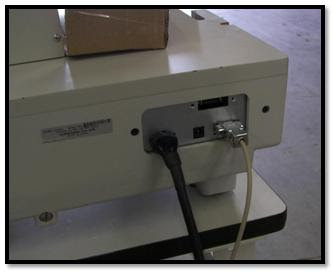 Plug in the 9-pin communication cable (female-to-female) to the 9-pin port on back of the Toyota embroidery machine.
If you have Toyota 820/830, this port will be 25-pins.
2. Plug other end of the communication cable to the USB.
3. Make sure everything is plug in on the USB and in the machine before you turn in on.
4. Start the USB and the machine at the same time.
5.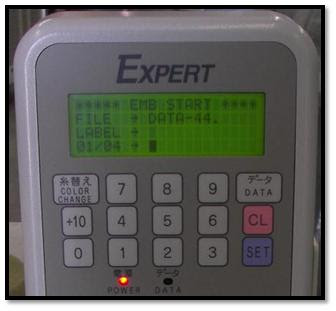 Insert the USB stick on the USB reader, wait until It says READY.
6. On the Toyota embroidery machine. Go to the [EMB Start] menu, if it is not already there.
7.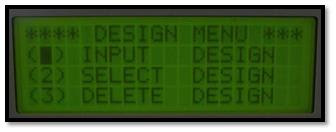 Press [DATA] button. It should be at the design menu now. Highlight [Input Design] and press [SET].
8.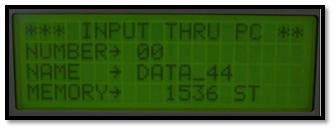 The screen now says [INPUT THRU PC]. The number defaults to [00].
9.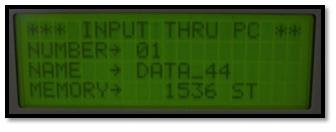 Change the number to [01] by using the keypad, and press [SET].
(Or whatever number on you design.)
10.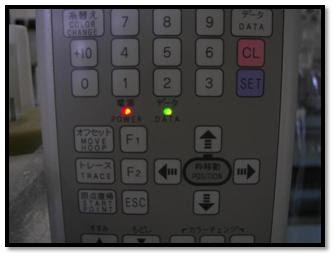 The [DATA] light should blink green as it downloads. It will beep when completed the download.
Instructions to load a file from the USB Reader
1.
 Plug in the 9-pin communication cable (female-to-female) to the 9-pin port on back of the Toyota embroidery machine.
If you have Toyota 820/830, this port will be 25-pins.
2. Plug other end of the communication cable to the USB.
3. Make sure everything is plug in on the USB and in the machine before you turn in on.
4. Start the USB and the machine at the same time.
5.
 Insert the USB stick on the USB reader, wait until It says READY.
6. On the Toyota embroidery machine. Go to the [EMB Start] menu, if it is not already there.
7.
 Press [DATA] button. It should be at the design menu now. Highlight [Input Design] and press [SET].
8.
 The screen now says [INPUT THRU PC]. The number defaults to [00].
9.
 Change the number to [01] by using the keypad, and press [SET].
(Or whatever number on you design.)
10.
 The [DATA] light should blink green as it downloads. It will beep when completed the download.
Friday, July 24, 2009
Which is the best brand of embroidery machine to buy?
We would recommend Tajima, Barudan, Toyota, SWF and Melco.
But first of all you have to tell us what you are looking to do, and your budget. Of course, the best machines are more expensive. Melco, SWF and Toyota are on the more inexpensive end, and you can find one head--and up to 4 head--Melco and SWF machines in the $4000-$7000 range.
As for the Tajima and Barudan you can find them in the $5000-$8000 range, with software and everything.
Tajima is by far the best, as many of our customers have stated in one of the polls we have in our blogs. Click here to find some prices on Tajima machines.
If you are going to do any type of embroidery (ie. caps, polos, flags, jackets), the best option is a Tajima machine or a flat head machine, as the Melco, SWF or Toyota machines. Or the Barudan machines that came after 1995.
If you are doing flat garments (ie. polos, flags, jackets), Tajima and Barudan are the best because of the large sewing area and the quality of the embroidery.
But first of all you have to tell us what you are looking to do, and your budget. Of course, the best machines are more expensive. Melco, SWF and Toyota are on the more inexpensive end, and you can find one head--and up to 4 head--Melco and SWF machines in the $4000-$7000 range.
As for the Tajima and Barudan you can find them in the $5000-$8000 range, with software and everything.
Tajima is by far the best, as many of our customers have stated in one of the polls we have in our blogs. Click here to find some prices on Tajima machines.
If you are going to do any type of embroidery (ie. caps, polos, flags, jackets), the best option is a Tajima machine or a flat head machine, as the Melco, SWF or Toyota machines. Or the Barudan machines that came after 1995.
If you are doing flat garments (ie. polos, flags, jackets), Tajima and Barudan are the best because of the large sewing area and the quality of the embroidery.
Subscribe to:
Posts (Atom)