You would have to send us the entire control box for repairs.
2954 SE Loop 820
Fort Worth, Texas
76140
FYI we have a lot of experience with this problem.
Price is $400 to fix. For $600 we will repair the control panel and add/install a USB reader to it ($325 value)
For more information please call to: 619-819-2911
Or email to: ventas@tewh.com
Showing posts with label embroidery machine. Show all posts
Showing posts with label embroidery machine. Show all posts
Sunday, August 30, 2009


Tuesday, July 28, 2009
Can you load desings to a Toyota machine via USB External Drive?
YES, you can load designs to a Toyota Embroidery Machine via USB
Instructions to load a file from the USB Reader
1.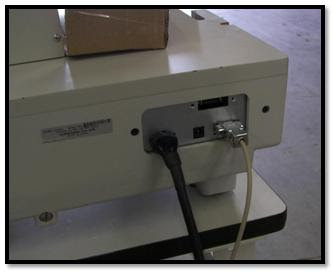 Plug in the 9-pin communication cable (female-to-female) to the 9-pin port on back of the Toyota embroidery machine.
If you have Toyota 820/830, this port will be 25-pins.
2. Plug other end of the communication cable to the USB.
3. Make sure everything is plug in on the USB and in the machine before you turn in on.
4. Start the USB and the machine at the same time.
5.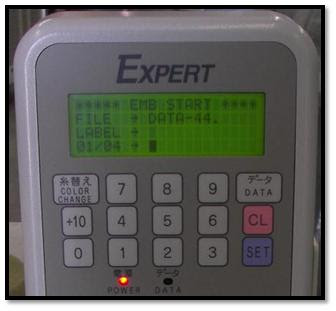 Insert the USB stick on the USB reader, wait until It says READY.
6. On the Toyota embroidery machine. Go to the [EMB Start] menu, if it is not already there.
7.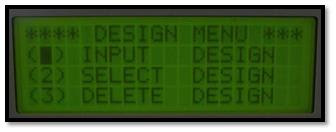 Press [DATA] button. It should be at the design menu now. Highlight [Input Design] and press [SET].
8.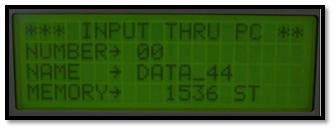 The screen now says [INPUT THRU PC]. The number defaults to [00].
9.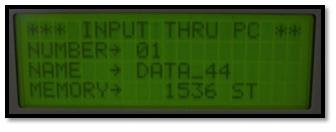 Change the number to [01] by using the keypad, and press [SET].
(Or whatever number on you design.)
10.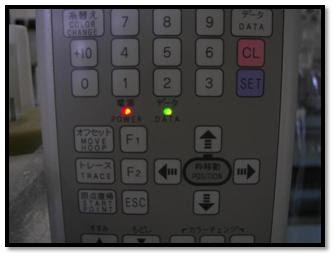 The [DATA] light should blink green as it downloads. It will beep when completed the download.
Instructions to load a file from the USB Reader
1.
 Plug in the 9-pin communication cable (female-to-female) to the 9-pin port on back of the Toyota embroidery machine.
If you have Toyota 820/830, this port will be 25-pins.
2. Plug other end of the communication cable to the USB.
3. Make sure everything is plug in on the USB and in the machine before you turn in on.
4. Start the USB and the machine at the same time.
5.
 Insert the USB stick on the USB reader, wait until It says READY.
6. On the Toyota embroidery machine. Go to the [EMB Start] menu, if it is not already there.
7.
 Press [DATA] button. It should be at the design menu now. Highlight [Input Design] and press [SET].
8.
 The screen now says [INPUT THRU PC]. The number defaults to [00].
9.
 Change the number to [01] by using the keypad, and press [SET].
(Or whatever number on you design.)
10.
 The [DATA] light should blink green as it downloads. It will beep when completed the download.
Friday, July 24, 2009
Do the used Tajima or Barudan embroidery machines have the same features as the new embroidery machines?
Yes, they do have the same features.
You have to keep in mind that even the first machines from the 1970s make the same stitches as the machines from the 90's as do the machines just coming off the assembly line.
Take into account some specifications:
For more related posts about used and new embroidery machines, please refer to:
>>Used vs. New Embroidery Machines
>>Embroidery - The Best Time To Buy
You have to keep in mind that even the first machines from the 1970s make the same stitches as the machines from the 90's as do the machines just coming off the assembly line.
Take into account some specifications:
- Speed: has only been increased less than 25% since the 1970s. The machines from the 1990s have the same speed as the brand new machines.
- USB Drives: there are new solutions for that, and a USB drive can be installed in any machine, no matter the year or the brand.
- Number of Needles: most machines come with 6, 7, 9, 10, 12 or 15 needles, some are brand new some are used, it depends more on what you are going to do.
- Sensors: the thread brake sensors and bobbin sensors have been in the embroidery machines for quite a while (10-15 years now).
For more related posts about used and new embroidery machines, please refer to:
>>Used vs. New Embroidery Machines
>>Embroidery - The Best Time To Buy
Can you embroider on dog leashes?
Yes, you can.
Yes, you can customize dog collars, harnesses, and potentially leashes.
And with most embroidery machines you can make customized embroidery designs as well..
As for a budget, you should be spending less than $10,000 for a one head embroidery machine. As a matter of fact you can get this two head embroidery machine for $11,000.
Yes, you can customize dog collars, harnesses, and potentially leashes.
And with most embroidery machines you can make customized embroidery designs as well..
As for a budget, you should be spending less than $10,000 for a one head embroidery machine. As a matter of fact you can get this two head embroidery machine for $11,000.

What is the price of a single head embroidery machine?
The price of a single head used embroidery machine is usually below the $10,000 mark.
$12k -15k for a machine is more towards a multi-head embroidery machine than a portable embroidery machine. However, for that amount you could almost get 2 single heads.
You can find many machines in that price range ($2000 to $8000) by clicking here. You will be able to find great machines like the Tajima 1501 or the Melco Amaya for under $10,000.
And if you are looking for a portable 1 head embroidery machine, the best options are the Toyota embroidery machines or the Tajima Neo machines.
$12k -15k for a machine is more towards a multi-head embroidery machine than a portable embroidery machine. However, for that amount you could almost get 2 single heads.
You can find many machines in that price range ($2000 to $8000) by clicking here. You will be able to find great machines like the Tajima 1501 or the Melco Amaya for under $10,000.


And if you are looking for a portable 1 head embroidery machine, the best options are the Toyota embroidery machines or the Tajima Neo machines.
Subscribe to:
Posts (Atom)